 Speed Patterns


See and Do
When a user can see a button, they assume they can press it. When they can read a form field, they assume they can type into it. The mental model is simple: visible means usable. The web routinely violates this assumption — JavaScript is still parsing, hydrating, or executing long tasks during the seconds after first paint, and the page sits there looking interactive while not actually responding to input.
The Problem
Modern web apps frequently have a window — sometimes a few hundred milliseconds, sometimes several seconds — between when content becomes visible and when the page is actually ready to handle interaction. During that window:
- Clicks may be silently dropped because no event listener is attached yet
- Inputs may register keystrokes but not validate, autocomplete, or submit
- Long tasks on the main thread (script evaluation, framework hydration, expensive layout) block the event loop, so even queued events sit waiting
The user's experience is "I tapped the button and nothing happened." From their perspective, the site is broken. From the dev tools' perspective, the page is "loaded" — the metric just doesn't match the experience.
The user can see the page and the button (SEE), but a long task on the main thread is still blocking input — the click goes nowhere (DO).
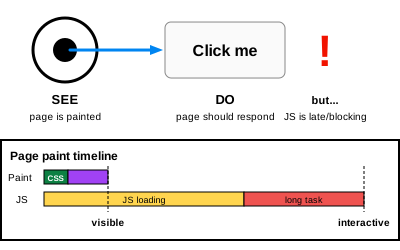
Solution
Treat interactivity as part of the loading experience, not a separate concern. The goal is to close the gap between "the user can see it" and "the user can use it" — ideally to zero.
Don't render UI you can't yet operate
If a control isn't ready to do its job, don't show it as if it were. Options:
- Render the control disabled until its handler is wired up. The user can see it but visibly cannot use it yet — that mismatch is honest
- Defer the entire feature behind a placeholder, and swap it in only when its code is loaded. This is the Convert on Arrival pattern
- Keep the form action working without JavaScript so a submit during the gap still works — the page progressively enhances rather than depending on scripts for basic function
Make critical input paths cheap
Even when the rest of the page is busy, the path that handles "click the most important button on this view" should be reachable. If your hero CTA depends on a 200KB bundle that's still parsing, that's a design choice — usually the wrong one. Treat the most important interactions on each page as a budget: their handlers must be ready by the time the user can see them.
Watch the right thing
Time-to-paint metrics don't tell you whether the page is responsive. Decisions need to be informed by interactivity metrics, not just paint metrics. Real-user monitoring (RUM) on responsiveness exposes problems that lab tests on fast hardware will hide.
Why This Matters
A site that scores well on paint metrics but fails on interactivity feels worse than one that paints a bit slower but is responsive from the moment things appear. Users don't measure performance in milliseconds — they measure it in trust. Every dropped click chips away at that trust.
The "see and do" gap is also one of the easiest performance problems to overlook because most automated checks don't surface it. Closing the gap means resisting the urge to ship visually-finished but functionally-incomplete UI.
Related Patterns
- Acknowledge Actions — what to do once interaction is ready
- Convert on Arrival — staging interactivity progressively
- Skeletal Designs — placeholders for content that isn't ready yet
Technical Implementation
Metrics to watch
- Interaction to Next Paint (INP) — measures the latency of real user interactions. A page with bad INP looks fast and feels broken
- Total Blocking Time (TBT) — sums up the time the main thread is blocked by long tasks during load
- Long Tasks API — surfaces individual tasks longer than 50ms that prevent the page from responding to input. (Long Tasks spec)
- Time to Interactive (TTI) — when the page has been visually ready and the main thread has stayed quiet long enough to handle input
Watch INP and TBT in real-user monitoring, not just lab tests — the lab can hide problems that real devices and real interaction patterns expose.
Breaking up long tasks
The main thread is a single lane. While it's busy compiling a 400KB framework bundle or hydrating a thousand components, every user input is queued behind that work.
- Split work into smaller chunks using
requestIdleCallback,scheduler.postTask, or simplesetTimeout(0)yields - Defer non-critical scripts with
async,defer, or dynamic imports gated by interaction - Avoid re-hydrating already-rendered server HTML when possible — emerging patterns like resumability, islands, and selective hydration target exactly this cost
- Audit third-party scripts. Tag managers, analytics, A/B testing libraries and chat widgets are common sources of long tasks that block the page during the most visible part of load